
This post is about my Lenovo 510s 32 GB RAM Jellyfin upgrade. Recently, I found a matching 16 GB DDR4 stick for 50 USD, which is rare these days as AI demand keeps pushing memory prices around. Because of that, upgrading RAM whenever I can is my top priority. With the second stick installed, Lil Beast now runs in dual channel and I have 32 GB total. As a result, Jellyfin should feel better with this setup, especially when I transcode. Meanwhile, I will share more about my Jellyfin server soon since I have not written about it yet.
(more…)Author: hatim0595
-

My Beginner Homelabber Take on Self‑Hosting Clawdbot (Moltbot)
TLDR; Can I self-host Clawdbot?
This week my timeline turned into a lobster parade. Everyone was talking about Clawdbot, sharing screenshots, “AI employee” stories, and lots of 🦞 energy. I’m a beginner homelabber, and I’m also the kind of person who clicks when the internet gets loud. So I did what I always do. I started reading, watching, and trying to understand what this thing actually is.
(more…) -
XLOOKUP vs VLOOKUP in Excel (2026 Guide): Faster, Safer Lookups You’ll Actually Use
Switch from VLOOKUP to XLOOKUP in minutes. Learn exact vs approximate matches, left‑lookups, wildcards, multi‑criteria, and 2D lookups—with copy‑paste formulas and a sample workbook.
TL;DR
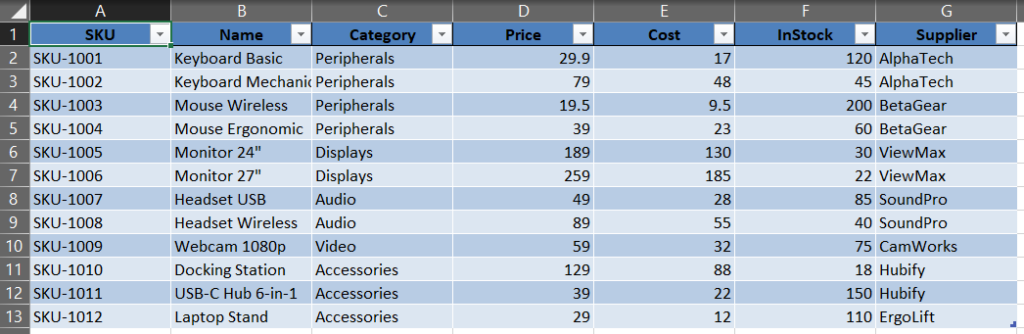
Sample data as an Excel Table ( Products).- XLOOKUP replaces VLOOKUP and HLOOKUP with one function that’s direction‑agnostic, easier to read, and more robust (no “column number” to break).
- Use XLOOKUP for exact, approximate, left‑lookups, wildcards, multi‑criteria, and 2D lookups.
- Grab the sample workbook and formulas below to practice right away.
-
Power Query in Excel: Combine All CSVs from a Folder (Auto‑Refresh)

Want to combine CSV files from a folder in Excel without VBA? In this tutorial you’ll use Power Query to point at a folder, combine every CSV into one clean table, and enable auto‑refresh so next month’s file drop updates your report in one click.
TL;DR
If you receive the same report every period (e.g., monthly CSVs), you can point Power Query at a folder, combine all files, and auto‑refresh next time you drop a new CSV into that folder—no manual copy‑paste ever again.
- Time: 10–15 minutes
- Works with: Excel for Microsoft 365 and Excel 2019/2021 (Power Query)
- Deliverable: A clean, analysis‑ready table and an optional PivotTable dashboard
-
My First Steps with Docker on Windows 10 (Part 2): From Install to WordPress in 5 Minutes
Reading time: ~7 minutes
Recap of Part 1: In Part 1 I explained why I chose Docker on my Windows 10 PC and how a containerized WordPress lets me learn safely without touching my live site. In this follow up, we install Docker Desktop, run a quick test, then start WordPress with Docker Compose.
Why run Docker WordPress on Windows 10
If you want a clean and isolated WordPress to test themes, plugins, or migrations, Docker on Windows 10 is a simple and repeatable approach. It keeps experiments in a sandbox, so your main system remains untouched. You can start fresh at any time. In my case, this setup is run on Lil beast.
(more…)