Tag: Excel

  • XLOOKUP vs VLOOKUP in Excel (2026 Guide): Faster, Safer Lookups You’ll Actually Use

    Switch from VLOOKUP to XLOOKUP in minutes. Learn exact vs approximate matches, left‑lookups, wildcards, multi‑criteria, and 2D lookups—with copy‑paste formulas and a sample workbook.


    TL;DR
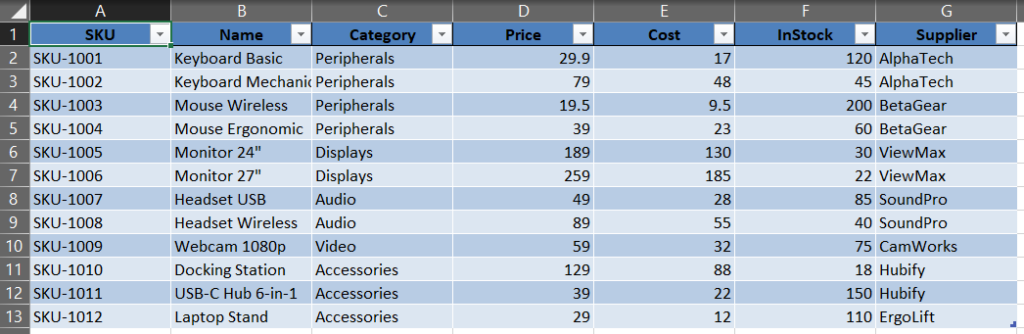
    Sample data as an Excel Table (Products).
    • XLOOKUP replaces VLOOKUP and HLOOKUP with one function that’s direction‑agnostic, easier to read, and more robust (no “column number” to break).
    • Use XLOOKUP for exact, approximate, left‑lookups, wildcards, multi‑criteria, and 2D lookups.
    • Grab the sample workbook and formulas below to practice right away.

    (more…)
  • Power Query in Excel: Combine All CSVs from a Folder (Auto‑Refresh)

    Want to combine CSV files from a folder in Excel without VBA? In this tutorial you’ll use Power Query to point at a folder, combine every CSV into one clean table, and enable auto‑refresh so next month’s file drop updates your report in one click.

    TL;DR

    If you receive the same report every period (e.g., monthly CSVs), you can point Power Query at a folder, combine all files, and auto‑refresh next time you drop a new CSV into that folder—no manual copy‑paste ever again.

    (more…)